
























Table of Contents
What is an exploit and what is it used for?
Zero-day exploits (0-day / zero day)
Exploits in devices and services
Exploits in mobile and web applications
Notable examples: EternalBlue and BlueKeep
What is anti-exploit protection?
Data Execution Prevention (DEP)
Address Space Layout Randomisation (ASLR)
What is an exploit and what is it used for?
An exploit is a piece of code, software or technique that takes advantage of a vulnerability in a system (application, network device, etc.) to carry out unauthorised actions.
- Remote exploit: Allows an attacker to compromise a system without physical access.
- Local exploit: Works from a user with limited access to escalate privileges.
Its legitimate use (for example, in penetration testing) helps to improve security, but in the wrong hands it can lead to data theft, service outages and, ultimately, financial and reputational damage.
Types of exploits
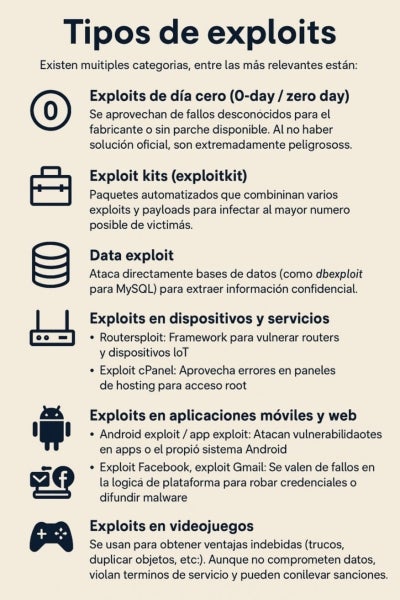
There are several categories, the most relevant of which include:
Zero-day exploits
These exploit vulnerabilities that are unknown to the manufacturer or for which no patch is available. As there is no official fix, they are extremely dangerous.
Exploit kits (exploitkit)
Automated packages that combine various exploits and payloads to infect as many victims as possible.
Data exploits
These directly attack databases (such as dbexploit for MySQL) to extract confidential information.
Exploits on devices and services
- Routersploit: A framework for compromising routers and IoT devices.
- cPanel exploit: Exploits vulnerabilities in hosting control panels to gain root access.
Exploits in mobile and web applications
- Android exploit / app exploit: These target vulnerabilities in apps or the Android system itself.
- Facebook exploit, Gmail exploit: These exploit flaws in the platform’s logic to steal credentials or spread malware.
- Moodle exploit: Focuses on the educational platform to manipulate marks or steal student information.
Exploits in video games
These are used to gain unfair advantages (cheats, duplicating items, etc.). Although they do not compromise data, they breach terms of service and may result in penalties.
Notable examples: EternalBlue and BlueKeep
- EternalBlue : Exploited a vulnerability in Windows SMB for which no initial patch was available, unleashing the WannaCry ransomware in 2017 and affecting thousands of organisations worldwide.
- BlueKeep : Discovered in 2019, this is a critical flaw in the Windows RDP service; Microsoft released emergency updates due to the risk of a large-scale attack similar to EternalBlue.
Both highlight the severity of a zero-day exploit, as its unknown nature and rapid spread make it an effective weapon for cybercriminals.
Exploit vs. Payload
- Exploit: Code that triggers the vulnerability.
- Payload: Malicious code that runs after gaining access (this could be a Trojan, ransomware or backdoor).
Think of the exploit as the key that opens the door and the payload as the intruder who comes in to steal your data.
What is anti-exploit protection?
Anti-exploit protection comprises a set of system- and application-level mitigations that prevent malicious code from exploiting known or unknown vulnerabilities.
Unlike traditional antivirus software (which detects malware signatures), anti-exploit protection proactively monitors process behaviour and memory to stop the attack in its early stages.
Sandboxing
It runs applications or processes in isolated environments, so that any malicious behaviour is contained and cannot affect the rest of the system.
Examples of sandboxing:
- Web browsers: Google Chrome and Microsoft Edge isolate each tab in a separate process container.
- Windows Defender Application Guard: uses Hyper-V containers to open highly suspicious websites in a separate virtualised environment.
- Docker / Kubernetes: in server environments, it restricts privileges and access to resources for microservices.
Integrity checking
Constantly verifies that critical code and data have not been tampered with.
- Code signing: cryptographic signatures on executables and libraries.
- Secure Boot and UEFI: block unsigned kernels or drivers.
- HMAC/checksums: Windows File Integrity Monitoring and EDR solutions that compare file checksums with reference values.
Data Execution Prevention (DEP)
Prevents memory regions dedicated to data from being executed as code. DEP achieves this by marking memory pages with the processor’s NX (‘no-execute’) bit.
- Implementation: hardware (Intel XD, AMD NX) and software (section marking).
- Operating modes:
- Enforced: blocks at runtime and generates an exception.
- Opt-in/Opt-out: allows exceptions for legacy applications following an impact assessment.
- NIST recommendation: “Enable Operating System Anti-Exploitation Features/Deploy Anti-Exploitation Tools” includes DEP as a minimum control
Address Space Layout Randomisation (ASLR)
Randomly relocates the memory addresses of libraries, the heap, the stack and other critical regions at every boot or module load. This makes it difficult to predict where to inject or redirect the execution flow.
- Levels of ASLR:
- Module-level: moves DLLs.
- Bottom-up: shifts the heap.
- High-entropy (64-bit): on 64-bit architectures, with higher entropy.
- Integration with Windows and Linux:
- Windows 10/11 supports ASLR based on managed memory via Defender Exploit Guard.
- Linux PIE (Position-Independent Executables) and KASLR (Kernel ASLR) are enabled by default in many distributions.
Complementary mitigation techniques
Mitigation | Description |
| Control Flow Guard (CFG) | Checks at runtime that indirect calls point only to valid destinations (Windows). |
| Stack Cookies / Canaries | Inserts sentinel values before the return address; if these are corrupted, the process is terminated. |
| SafeSEH / SEHOP | Protects the structured exception handling chain (Windows). |
| Heap Protections | Large-scale deallocation (“heap feng shui”), early detection of overflows. |
| Attack Surface Reduction | Rules that block high-risk behaviour (ASR rules in Defender). |
Hacker vs. Exploiter
- Hacker: A technology expert who may have ethical (white-hat) or malicious (black-hat) intentions.
- Exploiter: A more specific role: someone who creates or uses exploits to breach systems.
Not all hackers are exploiters, but every exploiter is part of the wider ‘hacker world’.
Exploit-related offences
In legal terms, using an exploit without authorisation constitutes a computer crime :
- Unauthorised access: Gaining entry without permission to another person’s systems.
- Computer damage: Altering, destroying or rendering data and systems inoperable.
Penalties vary depending on the jurisdiction, but in Spain they may include heavy fines and prison sentences.
Turn cybercrime into your career opportunity
Some figures:
· INCIBE has put the number of cybersecurity professionals Spain will need this year (2025) at 99,600
· The Spanish Government’s strategic plan sets out specific objectives regarding digitalisation and, consequently, cybersecurity. One of its targets for 2025 is to have 20,000 new specialists in cybersecurity, AI and data.
With the UAX Online Master’s in Cybersecurity you will master:
🎯 Digital forensics and incident response
- You’ll be the detective who solves digital crimes in real time
🛡️ Ironclad security architectures
- You’ll design impenetrable digital fortresses
⚡ Controlled exploitation and vulnerabilities
- Routersploit, dbexploit, zero-day exploits: you’ll think like a hacker to beat the hackers
🚨 State-of-the-art anti-exploit solutions
- You’ll implement defences that anticipate attacks
Why is this Master’s programme different?
1. 100% real-world scenarios. No textbook theory: situations you’ll face on your very first day at work.
2. A flexible, online approach that will allow you to balance your studies with your professional and personal life.
3. You’ll receive support from personal tutors who’ll help you get the most out of your studies and your time.
4. A unique networking opportunity. You’ll connect with professionals who are already where you want to be.
If you’re still not sure, don’t miss our article ‘Why study cybersecurity?’ , where you’ll find more information about this highly sought-after specialism.
Do it at UAX!
Sources:
- OWASP Foundation – Security projects and mitigation guides.
- CERT-EU – Reports on zero-day vulnerabilities.
- NIST (National Institute of Standards and Technology) – Cybersecurity framework.
- ENISA (European Union Agency for Cybersecurity) – Best practices and security alerts.